
Download FindAMeal – AI‑Powered Restaurant Finder, Free & Secure
What Is FindAMeal? – A Detailed Overview
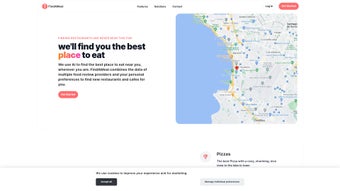
FindAMeal is an AI‑driven web application designed to turn the often chaotic process of choosing a place to eat into a fast, personalized experience. By pulling data from trusted sources such as Google, Yelp, Instagram and other social‑media feeds, the platform builds a rich profile for each restaurant, covering menus, price ranges, ambience, real‑time availability, and user‑generated reviews. What sets FindAMeal apart from generic list‑based services is its adaptive recommendation engine: the system learns your individual preferences over time and refines suggestions accordingly.
Whether you are searching for a quiet bistro for a romantic dinner, a bustling family‑friendly brunch spot, or a quick‑service café for a business lunch, the AI tailors results to match your habits, dietary restrictions and budget. The interface is built around a clean, responsive design that works equally well on desktops, laptops, tablets and smartphones. Integrated navigation lets you launch turn‑by‑turn directions with a single click, while the built‑in sharing tools allow you to send a recommendation to friends via a short URL, email or popular messaging apps.
All of these features are offered in a free tier that includes no hidden fees, and the service is continuously updated in the cloud to ensure the latest restaurant data is always at your fingertips. In short, FindAMeal combines powerful AI, comprehensive data aggregation, and a user‑centric design into a secure, free tool that helps you discover the perfect dining destination in seconds.
Core Features, Compatibility, and How the AI Learns Your Taste
Feature List
- AI‑powered recommendation engine that evolves with each interaction.
- Aggregated listings from Google, Yelp, Instagram and other reputable sources.
- Advanced filters for cuisine, price, dietary needs, ambience and more.
- Real‑time reservation and wait‑time checks where available.
- One‑click navigation integration with Google Maps, Apple Maps and Waze.
- Instant sharing via short URLs, email, WhatsApp, Facebook and Twitter.
- Bookmarking, history tracking and personalized “favorites” collections.
- Multi‑language support and accessibility‑focused UI elements.
- GDPR‑compliant data handling with optional cloud sync.
- Free basic tier plus optional premium add‑ons for deeper analytics and ad‑free experience.
Operating System Compatibility
As a fully web‑based solution, FindAMeal runs on any modern browser across all major operating systems. Whether you are on Windows 10/11, macOS Ventura, Chrome OS, Linux, Android 9+ or iOS 14+, the responsive layout automatically adjusts to your screen size, delivering a consistent experience on desktops, laptops, tablets and smartphones.
How the AI Engine Adapts to You
When you first open FindAMeal, a brief questionnaire asks about your favorite cuisines, typical price range, preferred dining atmosphere and any dietary restrictions. As you interact with the suggestions—accepting, rejecting, or rating each result—the machine‑learning model updates a personal preference vector in real time. This continuous feedback loop means the more you use the platform, the sharper its predictions become. All preference data is stored locally in an encrypted cookie unless you enable optional cloud sync, giving you full control over what is saved and where. The AI also factors in contextual signals such as time of day, location and recent trends, ensuring that a recommendation for “late‑night sushi” at 11 p.m. differs from a daytime brunch suggestion.
Installation, First‑Run Guidance and Keeping FindAMeal Updated
No Traditional Installation Required
Because FindAMeal lives entirely in the cloud, there is no download or install step. To begin, simply open www.findameal.com in any supported browser. For users who prefer an app‑like experience, both Android Chrome and iOS Safari provide an “Add to Home Screen” option that creates a shortcut with its own icon, launching the web app in full‑screen mode.
Step‑by‑Step First‑Run Workflow
- Create a free account: Sign up with an email address or use Google/Facebook OAuth for instant access.
- Set your profile: Complete the short questionnaire covering cuisine preferences, budget, and dietary needs.
- Enter a query: Type a natural‑language request such as “cozy Italian dinner near downtown” or “vegan brunch for two”.
- Explore curated results: Review a ranked list of venues, each displaying a rating summary, photo carousel, distance and a brief description of key features.
- Take action: Choose “View on Map” for navigation, “Reserve” to open the integrated booking widget, or “Share” to send a custom link to friends.
Keeping the Service Current
All updates to FindAMeal are performed server‑side, meaning you automatically receive the latest features, UI tweaks and data refreshes without needing to refresh the page or reinstall anything. New data sources are added regularly, and the AI model is retrained monthly to incorporate emerging food trends and seasonal menu changes. This continuous delivery model guarantees that you always have the most accurate, up‑to‑date restaurant information available.
Pros, Cons, Frequently Asked Questions and Final Verdict
Pros
- Highly personalized recommendations powered by adaptive AI.
- Aggregates data from multiple reputable sources for comprehensive listings.
- Free core functionality with optional premium upgrades.
- Works on Windows, macOS, Linux, Android and iOS via any modern browser.
- One‑click navigation and direct reservation links streamline the dining process.
- GDPR‑compliant privacy controls and optional cloud sync.
- Responsive design ensures a consistent experience on desktops, tablets and phones.
- Instant sharing via short URLs and social‑media integration.
Cons
- Requires an active internet connection; offline usage is limited.
- Advanced filtering options may have a short learning curve for new users.
- Premium analytics and ad‑free experience are behind a subscription.
- Reliance on third‑party data sources means occasional mismatches in opening hours.
Frequently Asked Questions
Is FindAMeal really free?
Yes. The core recommendation engine, sharing tools and navigation integration are completely free. A premium subscription is optional for users who want detailed analytics, ad‑free browsing and priority support.
How does FindAMeal protect my personal data?
FindAMeal follows GDPR guidelines, encrypts all stored preference data and offers an opt‑out of cloud sync so that information can remain only in encrypted browser cookies.
Can I use FindAMeal on a tablet?
Absolutely. The responsive design adapts to any screen size, providing the same feature set on tablets as on desktops or smartphones.
Does FindAMeal integrate with reservation platforms?
Yes. For many restaurants FindAMeal offers direct links to OpenTable, Resy or the venue’s own booking system, allowing you to secure a table without leaving the app.
What should I do if a recommendation seems outdated?
Use the “Report” button on the restaurant card. The FindAMeal team reviews the submission and updates the database promptly.
Final Verdict – Should You Download FindAMeal?
FindAMeal stands out in a crowded market of restaurant search tools by delivering a genuinely intelligent, privacy‑first experience that adapts to each user’s tastes. Its AI engine, extensive data aggregation and seamless navigation integration make it a compelling free option for anyone who dines out regularly or enjoys discovering new culinary spots. While a stable internet connection is required and some advanced filters may need a brief adjustment period, the benefits—personalized results, effortless sharing, and constant data freshness—far outweigh these minor drawbacks. Whether you are a casual diner, a family planner, or a food‑enthusiast hunting hidden gems, FindAMeal provides a fast, secure and continuously improving solution. Click the link above, create your free profile, and let AI guide you to your next unforgettable meal.
Overall Rating: 4.5/5






